Christian World Media
ChristianWorldMedia.com - Church live streaming network.
Publisher Login:
Username
Password
 

HOME LIVE CHURCH SERVICES START WEBCASTING SERMON ARCHIVING PUBLISHER LOGIN CONTACT US
     
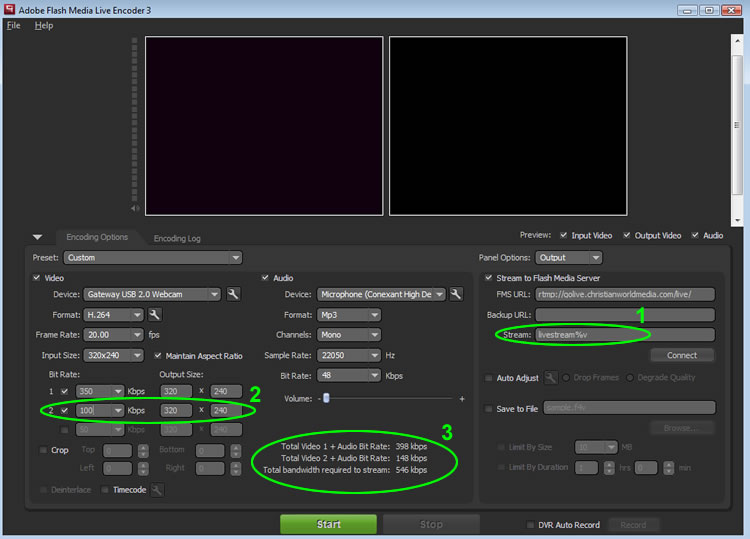
How to Multi Bit Stream With Flash Media Encoder.

 
  1. In the 'Stream' field enter a %v immediately after your stream name. 
  2. Click the #2 checkbox to enable a second stream. Then adjust the 'Bit Rate' field for your second stream. Typically you want this to be lower than your first stream.    (you may enter a 3rd stream if desired)
  3. Make sure that the UPLOAD speed of your internet connection can handle the kbps listed in the "Total bandwidth required to stream". (Click here to run a speed test)
  4. View your stream!  New options will appear on your channel page that will allow you to switch back and forth from the different quality streams you have setup.

    MOBILE STREAMING:  
    When using multi bit streaming, the lowest Bit Rate stream available is what your mobile-viewers will connect to automatically.


DISCLAIMER
The views expressed in any archived video or live webcast presented on our
website may not necessarily be the views of the CWM owners and staff.
FOLLOW CWM
  Home | Live Church Services | Start Webcasting | How to Webcast | Technology | Privacy Policy | Terms of Service | How to Guides
Copyright © 2012 ITP Productions (ITP Stream) dba ChristianWorldMedia.com, All Rights Reserved