|
|
 |
|
|
|
|
|
| |
These instructions will show you how to make your stream compatible for both website viewing and iPhone, iPod & iPad viewing.
The following instructions are for Flash Media Encoder but you can use these settings as a general guide with any encoder.
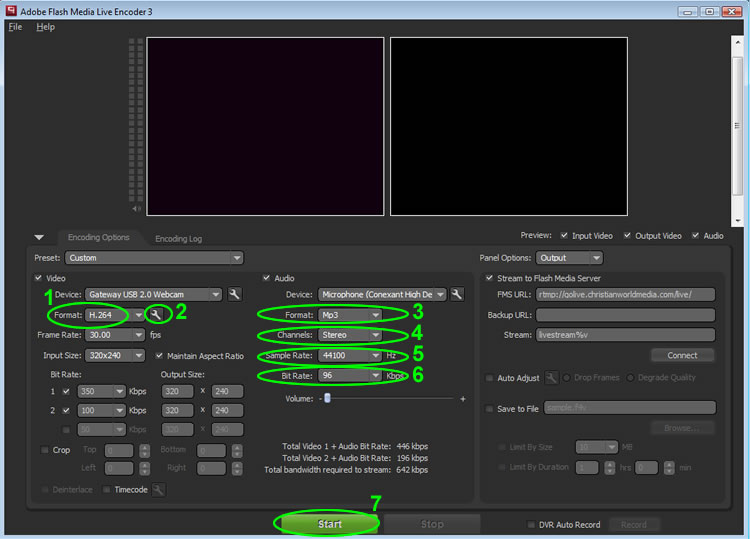
- Set the video 'Format' field to 'H.264'.
- Click the small "wrench" icon next to the 'Format' field and set 'Profile' to 'Baseline', 'Level' to '3.0' (or less) and set 'Keyframe Frequency' to '5 Seconds'.
- Set the audio 'Format' field to 'AAC' or 'MP3' (if available, AAC is preferred and will make your stream compatible with Droids)
- Set the audio 'Channels' setting to 'Stereo'.
- Set the audio 'Sample Rate' to '44100hz'
- Set your audio 'Bit Rate' to any desired bit rate.
- Start your stream and direct your mobile users to your dedicated player link provided in your CWM Stream Settings.
It will look like the following: 'www.cmobi.us/your-stream-name'. NOTE: If you are using any of our web player code on your own website and an iDevice user visits your webpage, they will automatically be redirected to the above url.
MULTI BIT STREAMING:
When using multi bit streaming you can stream a separate, lower bit rate stream to your mobile viewers.
Read more about multi bit streaming.
|
| |
|
|
|
|